
You are reading: Herdbook home / Seven-step guide
How to use GoatedBuy with the Spreadsheet, in seven steps
Account first, parcel last, with the official screen for each step and the charge each step adds.
This is GoatedBuy's own buying process, re-told with one screen per step. The images come from the official help centre for the 2.0 site, captured between late September and mid October 2026; the video is GoatedBuy's own walk-through from before the redesign. Where the two disagree, trust the images: they show the current site.
An email, a nickname and an optional invite code
Registration wants four things: an email address, a password entered twice, a nickname and, if you have one, an invite code. GoatedBuy checks an invite code against its records before it accepts it; a mistyped code brings up a warning rather than a silent failure. Tick the terms box and you are in. There is no phone number field.
Set your currency in the header before you look at prices. Everything is priced in yuan underneath, and the currency switch decides which rate from the currency table you see.
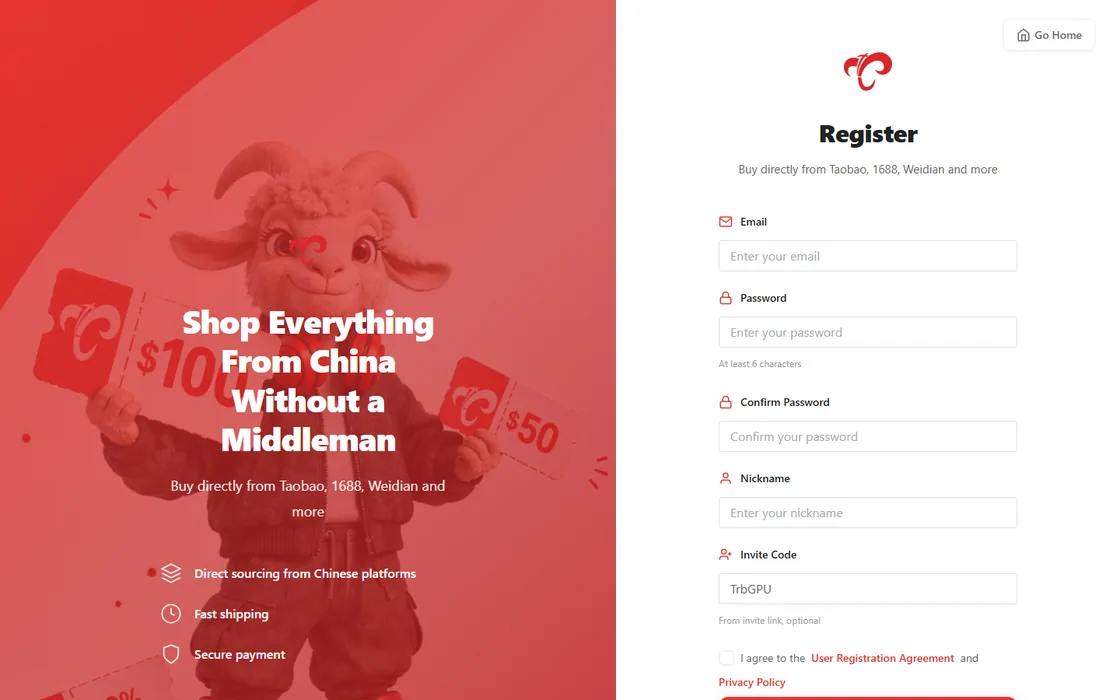
The 2.0 register page, 24 Oct 2026. Screenshot taken by this site. Paste the marketplace link, not a keyword
Copy the product link from Taobao, 1688 or Weidian, or from a find on the shelves, and paste it into the box on the GoatedBuy home page. GoatedBuy resolves the link and shows the listing inside its own product page. Typing a keyword instead does not work: version 2.0 has no product search, and when we tried hoodie on 24 Oct 2026 the box sent us to the 404 page.
If a link will not open, GoatedBuy's FAQ gives two reasons: the original listing has expired, or the item is something it will not ship. Look for another link to the same item.
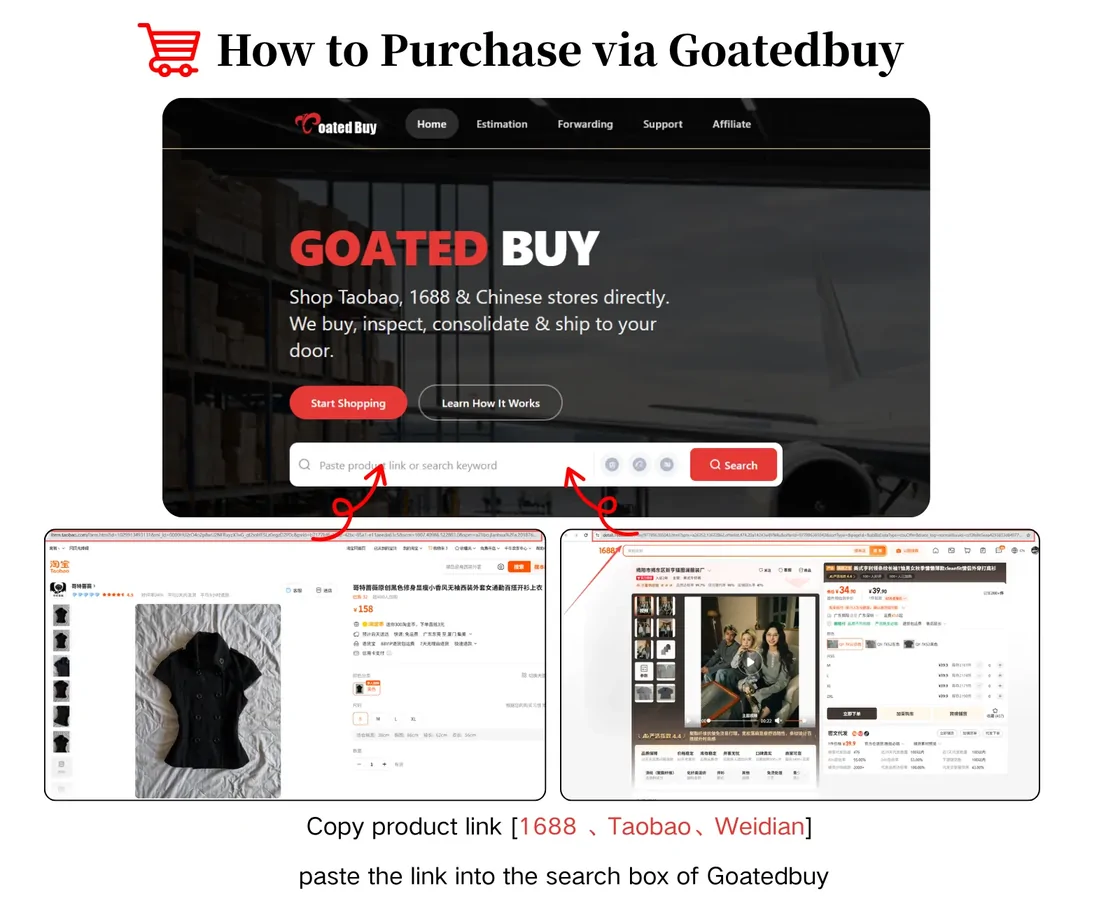
Official GoatedBuy guide image. Choose the option by name, then pay alone or in a cart
On the product page, choose colour and size, check the stock line and set the quantity. Buy Now is for a single item; Add to Cart is for paying several together. Both lead to the same order page. The message board on the product page is where you write anything the buyer should tell the seller, such as a second colour choice.
Read the option names word by word. A cheap option is sometimes a different item, and on 1688 the minimum order count sits under the quantity box.
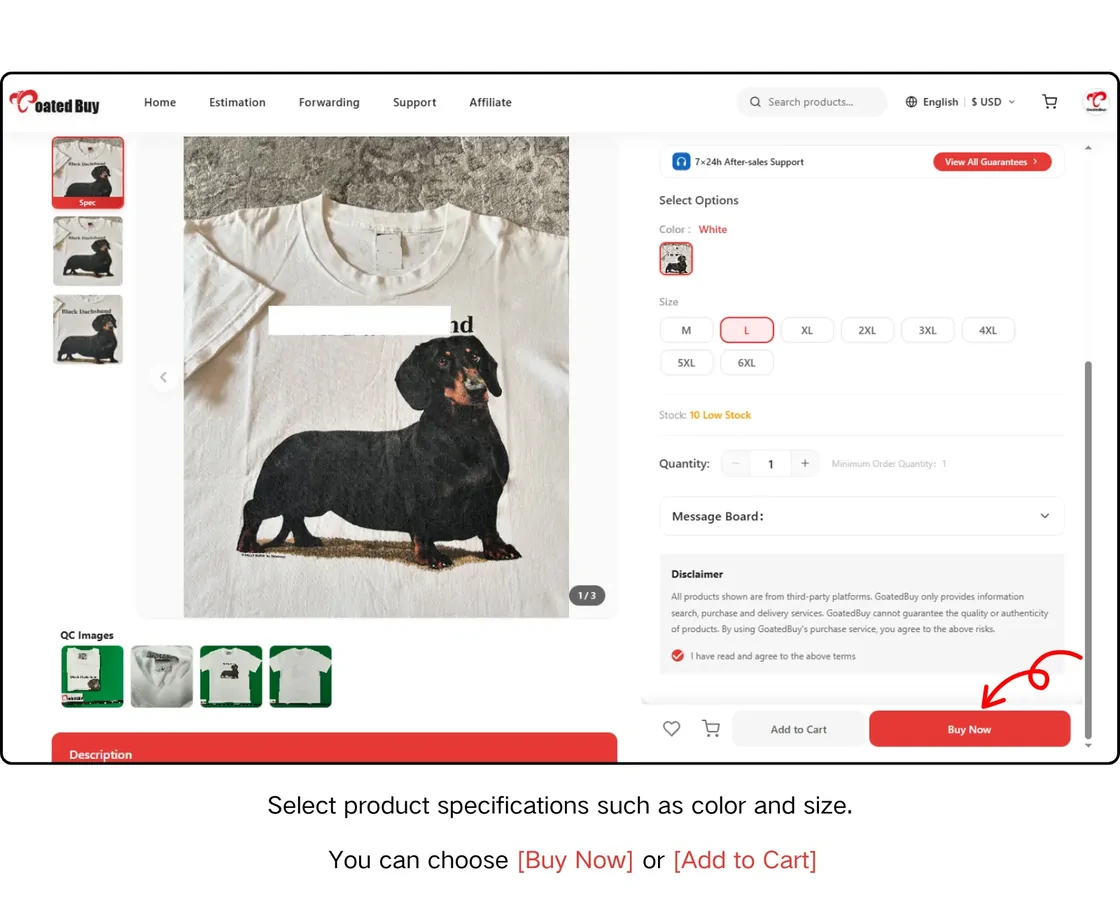
Official GoatedBuy guide image. Confirm the order, add an address and pay
The confirmation page lists the item total, the domestic post and a service fee of 0.00. You can add a video check or custom photos here. Your first order asks for a shipping address before payment, and the payment page lists the methods available for that country.
Pay from your balance or directly by card or a local method. In the official example a card paying to Germany carries a surcharge of 4.5 per cent and 50 cents; other methods have their own fees, shown before you pay.
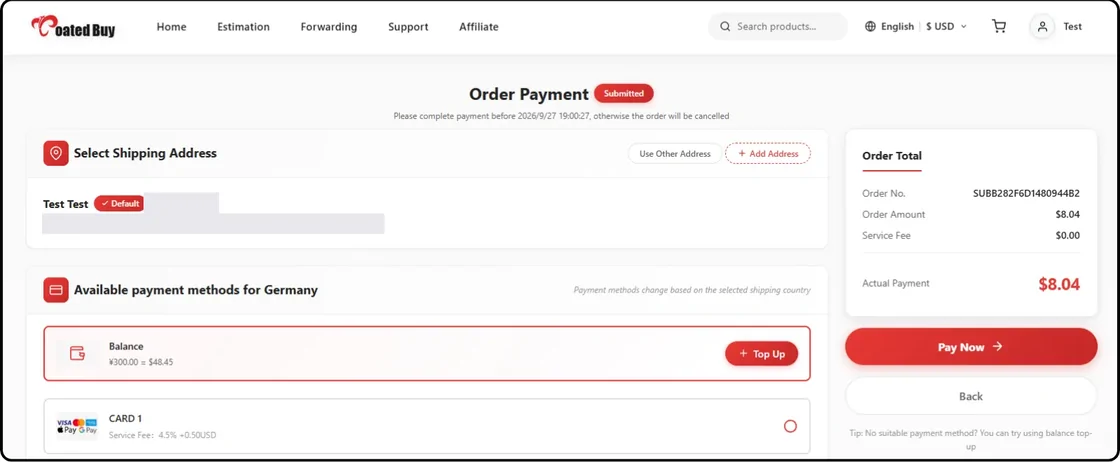
Official GoatedBuy guide image; the test address is blurred by this site. Watch the order reach the warehouse
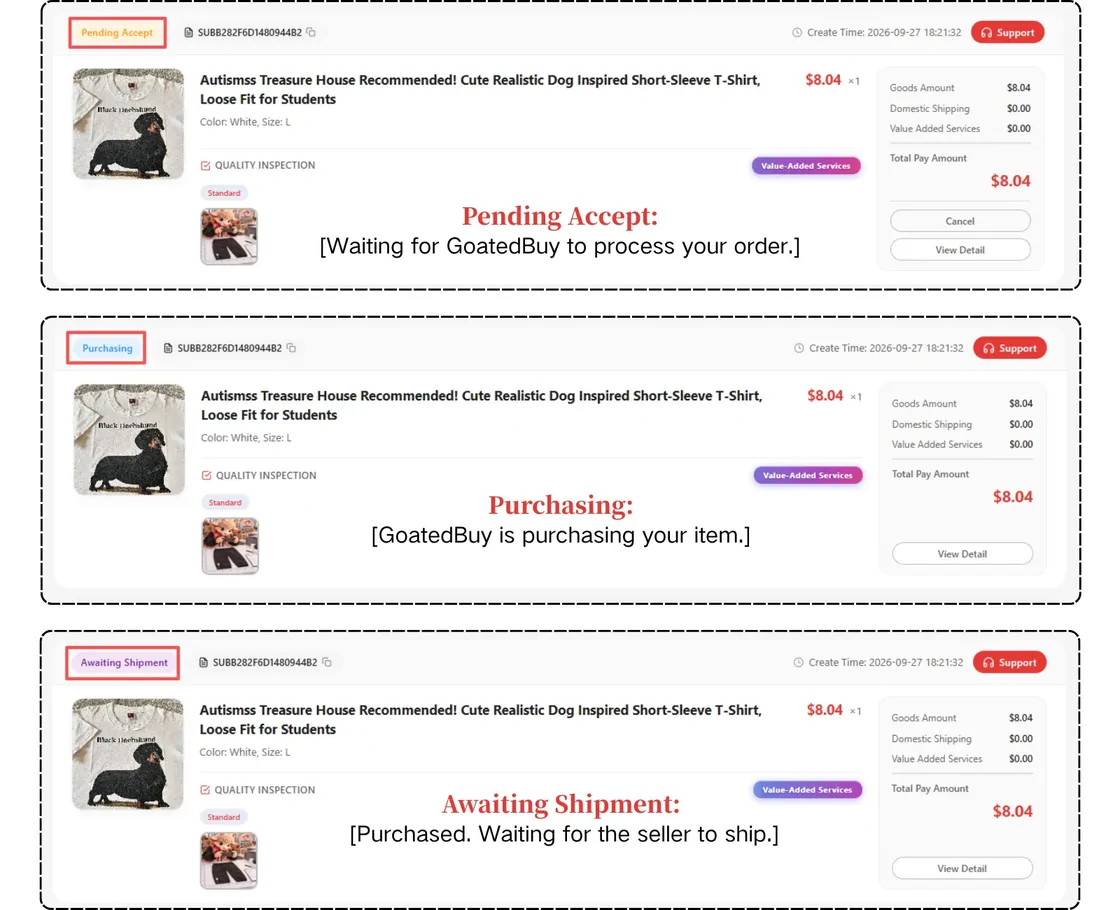
After payment the order shows Pending Accept, then Purchasing once GoatedBuy has reviewed it, usually within three to eight working hours. Awaiting Shipment means it is bought and the seller has not sent it. In Transit means it is on its way to Xiamen; that leg usually takes three to seven days.
Completed means it has arrived and its QC photos are in your account. The five-day return window starts here, so look at the photos the same day. The status ladder covers every name you will see.
Official GoatedBuy guide image. Submit a parcel from the Warehouse shelf
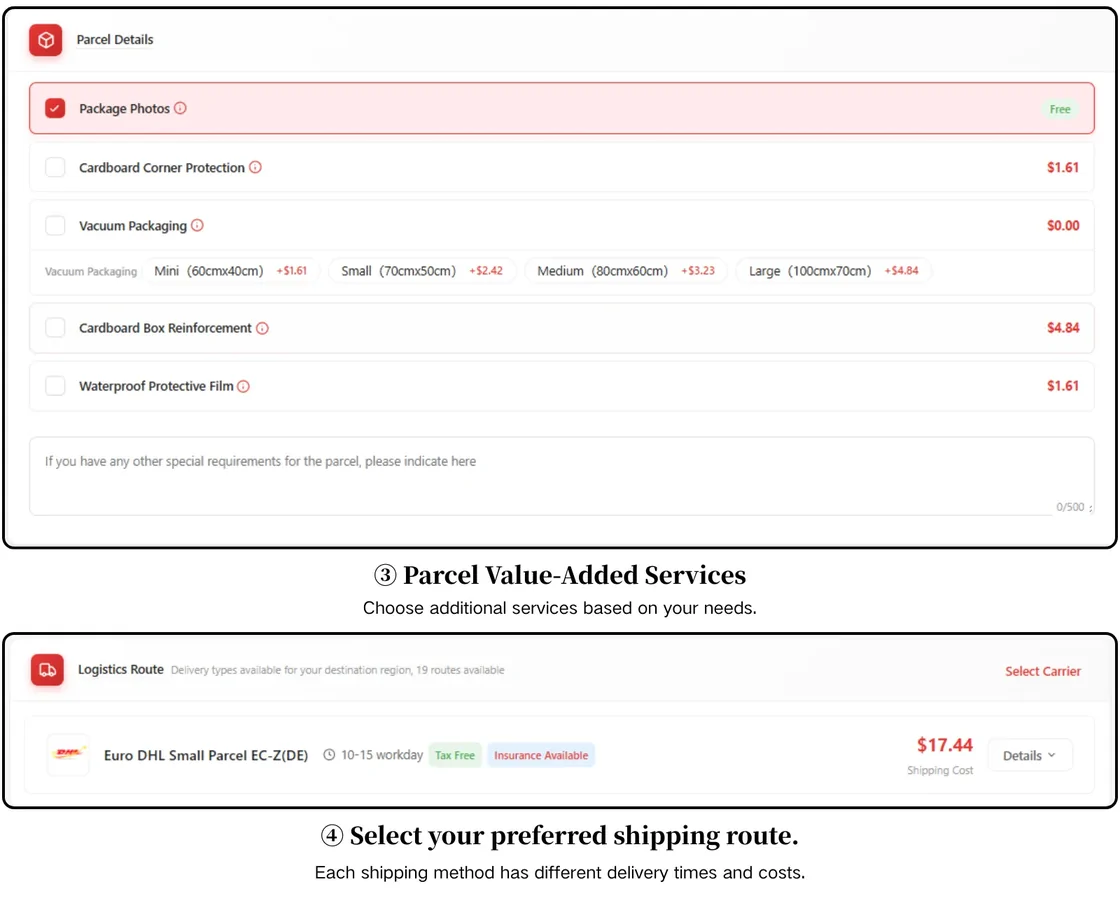
On the Warehouse page, select everything that should travel in one box, then press Submit Order. Then check the address, choose item add-ons such as removing shoe boxes, choose parcel add-ons such as vacuum bags or corner guards, pick a line, set the declared value and decide on insurance.
You pay the 10-yuan packing charge at this point. It is not the freight. Staff pack the parcel, measure and weigh it, and send you the real freight bill.
Official GoatedBuy guide image. Pay the final freight and track the box
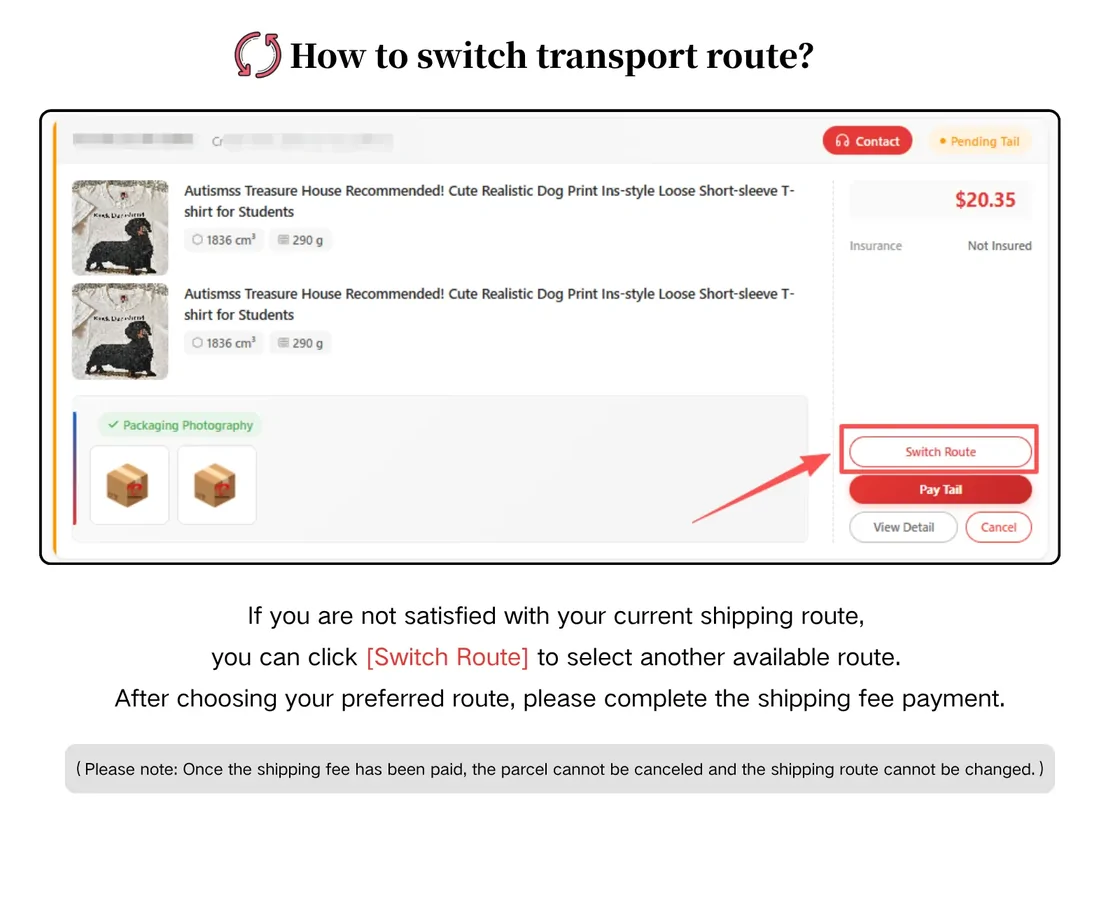
When the parcel shows Pending Tail, the measured freight is waiting. You can still switch to another line at this stage; once the freight is paid, the parcel cannot be cancelled or re-routed. Packed parcels usually leave within 24 hours of payment.
Tracking may stay blank for the first three days. When the box arrives, check the outside before signing, ideally on video, and keep the box and tape if anything is wrong. The after-it-lands entries cover the claim route.
Official GoatedBuy guide image.